⌘ K

Search

Search portal content

AI customer support in one tabAI customer support in one tab
⌘ K

Search

Search portal content

AI customer support in one tabAI customer support in one tab
  • Reply to a ticket
  • Ticket statuses
  • Start a new ticket
  • Assign tickets
  • Add internal notes
  • Use saved replies
  • Send and view attachments
  • Tag tickets
  • Set ticket priority
  • Snooze a ticket
  • Follow up with customers
  • Replies to closed tickets
  • Search and filter tickets
  • Save ticket views
  • Update tickets in bulk
  • Merge tickets
  • Change the requester
  • Move to another inbox
  • Report spam
  • Translate messages
  • Use Cc and Bcc
  • Sender verification
  • Handle sensitive requests
  • Manage customers
  • Manage companies
  • Ticket analytics
  1. Home
  2. Manage tickets

Replies to closed tickets

A customer reply to a closed ticket reopens that same ticket on email and in the Help Center. On Telegram and WhatsApp, a time window decides.

Replies to closed tickets

A customer reply to a closed ticket reopens that same ticket on email and in the Help Center. On Telegram and WhatsApp, a time window decides.

When a customer replies to a ticket you closed, initdesk usually reopens the same ticket. The history stays in one place, and your team sees the ticket as Needs response again.

Closed and resolved behave the same way. Resolved is only the reason a ticket was closed. See Ticket statuses.
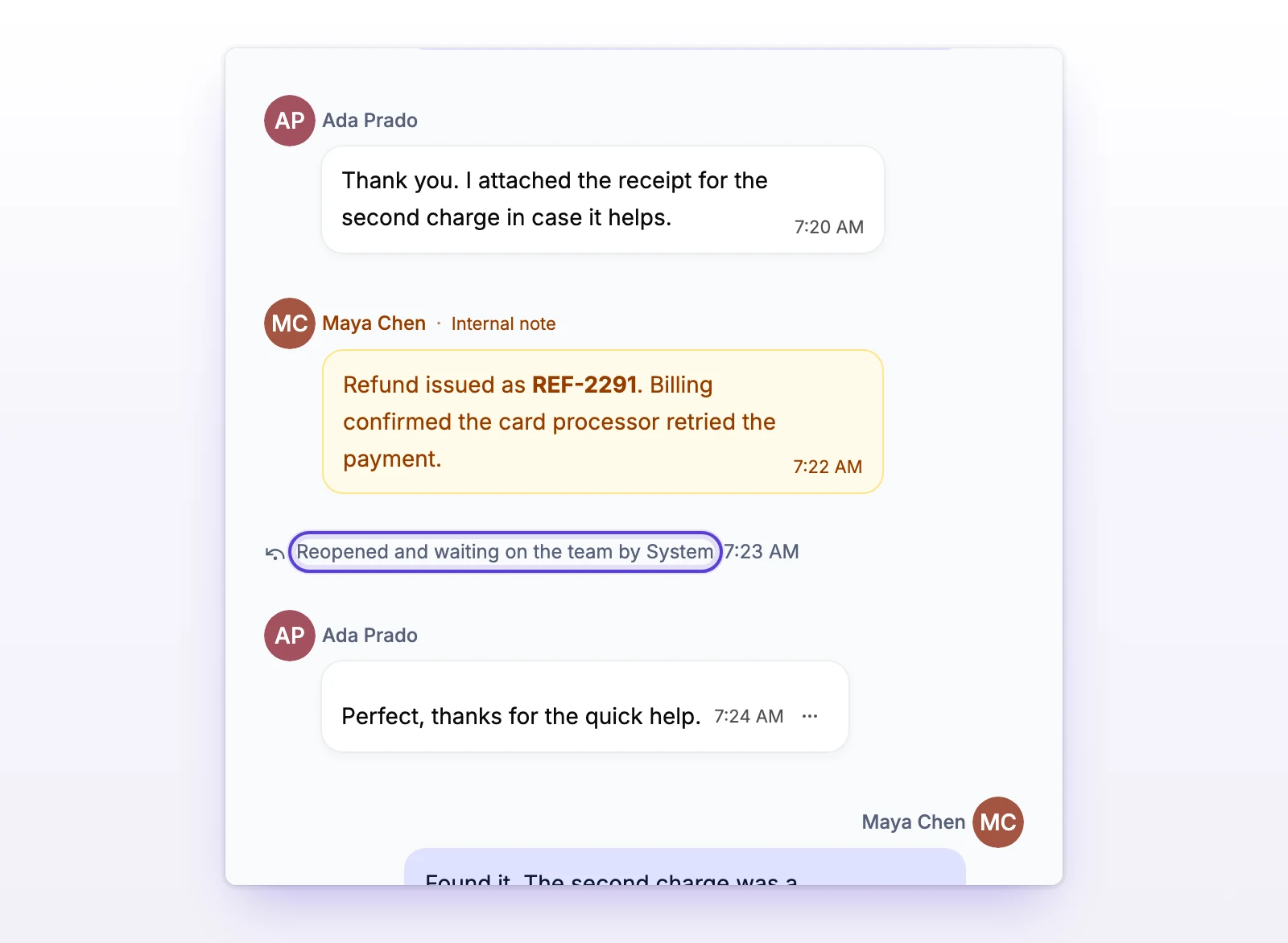
A ticket thread with the line Reopened and waiting on the team
The thread shows when a ticket was reopened.

Email

A reply to a closed email ticket reopens it. There is no time limit and no setting to turn it off.

  • The reply can come from the requester or from someone in Cc. Both reopen the ticket.
  • Automatic replies and bounces don't reopen a ticket.
  • A reply to a ticket that was merged goes to the ticket it was merged into, and that ticket reopens. See Merge tickets.
  • If the email can't be matched to an existing ticket, for example the customer wrote a fresh email instead of replying, initdesk creates a new ticket.

Help Center

If you let customers view their tickets in the Help Center, a reply from the customer there reopens the ticket the same way. See Set up customer accounts.

Telegram

A Telegram message reopens a closed ticket only when both of these are true:

  • It arrives within the Session window. The default is 24 hours, and you can set 1 to 168 hours.
  • Reopen closed tickets is on. It's on by default.

If either one isn't true, the message opens a new ticket.

To change these, go to Settings > Inboxes, open the inbox, and open its Telegram channel. The options are under Message settings.

WhatsApp

A WhatsApp message reopens a closed ticket when it arrives within a 24-hour window. The window can be shorter than 24 hours but never longer. There's no WhatsApp control for this in the app today, so the default applies.

If your team sent the customer a WhatsApp template recently, replies to it stay on that ticket and reopen it. See Use WhatsApp templates.

After the window, the next message opens a new ticket.

What happens when a ticket reopens

  • Status: it becomes Needs response. The closed reason is cleared.
  • Assignee: it stays the same.
  • Notifications: your team gets the usual customer reply notification. That goes to the assignee, or to everyone with access to the inbox when nobody is assigned. Each person's notification settings apply. See Set up notifications.
  • Auto-reply: none is sent. Automatic replies only go out when a ticket is created. See Set up auto-reply.
  • Webhooks: the ticket sends a status change event and a customer reply event. There is no separate "reopened" event. See Set up webhooks.

Reopen a ticket yourself

You can also reopen a closed ticket without waiting for the customer.

  • Select Reopen in the ticket header, or press A. The ticket becomes Needs response.
  • Press C, or choose Waiting on customer in the Status menu, to reopen it as Waiting on customer.
  • Reply to the ticket. The send button reads Send and reopen ticket, and the Status after reply menu offers Reopen to customer (the default) and Reopen to team.

See Reply to a ticket.

Why it works this way

Customers usually answer the email they already have. A reply is a sign they still need help, so initdesk keeps it on the same ticket instead of starting a new one.

If something's not working

If a reply created a new ticket instead of reopening the old one

For email, the reply didn't match the old ticket. That happens when the customer starts a new email thread. You can combine the two tickets. See Merge tickets.

For Telegram and WhatsApp, the message arrived after the window, or Reopen closed tickets is off on Telegram.

Related

  • Ticket statuses
  • Merge tickets
  • Connect Telegram
  • Connect WhatsApp
Follow up with customers

Find tickets where you're waiting for the customer, nudge them with a reply, and let initdesk send a reminder or close quiet tickets for you.

Search and filter tickets

Search tickets by subject, customer, ticket number, or message text, then narrow the list with filters and change the order.

Powered by initdesk
On this page
  • Replies to closed tickets
  • Email
  • Help Center
  • Telegram
  • WhatsApp
  • What happens when a ticket reopens
  • Reopen a ticket yourself
  • Why it works this way
  • If something's not working
  • If a reply created a new ticket instead of reopening the old one
  • Related