
How AI works
See where AI helps in initdesk, what it reads for each job, and what happens when it has no answer. AI drafts, a person sends.
Search portal content
Search portal content
See where AI helps in initdesk, what it reads for each job, and what happens when it has no answer. AI drafts, a person sends.
See where AI helps in initdesk, what it reads for each job, and what happens when it has no answer. AI drafts, a person sends.
initdesk uses AI in four places: drafting replies to tickets, summarizing tickets, tagging new tickets, and answering customers in your help center chat. In every place the rule is the same: AI drafts, a person sends. The only exception is the help center chat, where the AI answers first and hands over to your team when it can't.
AI is included in your plan. You don't pay extra for it.
Each job reads different things. This table is the whole list.
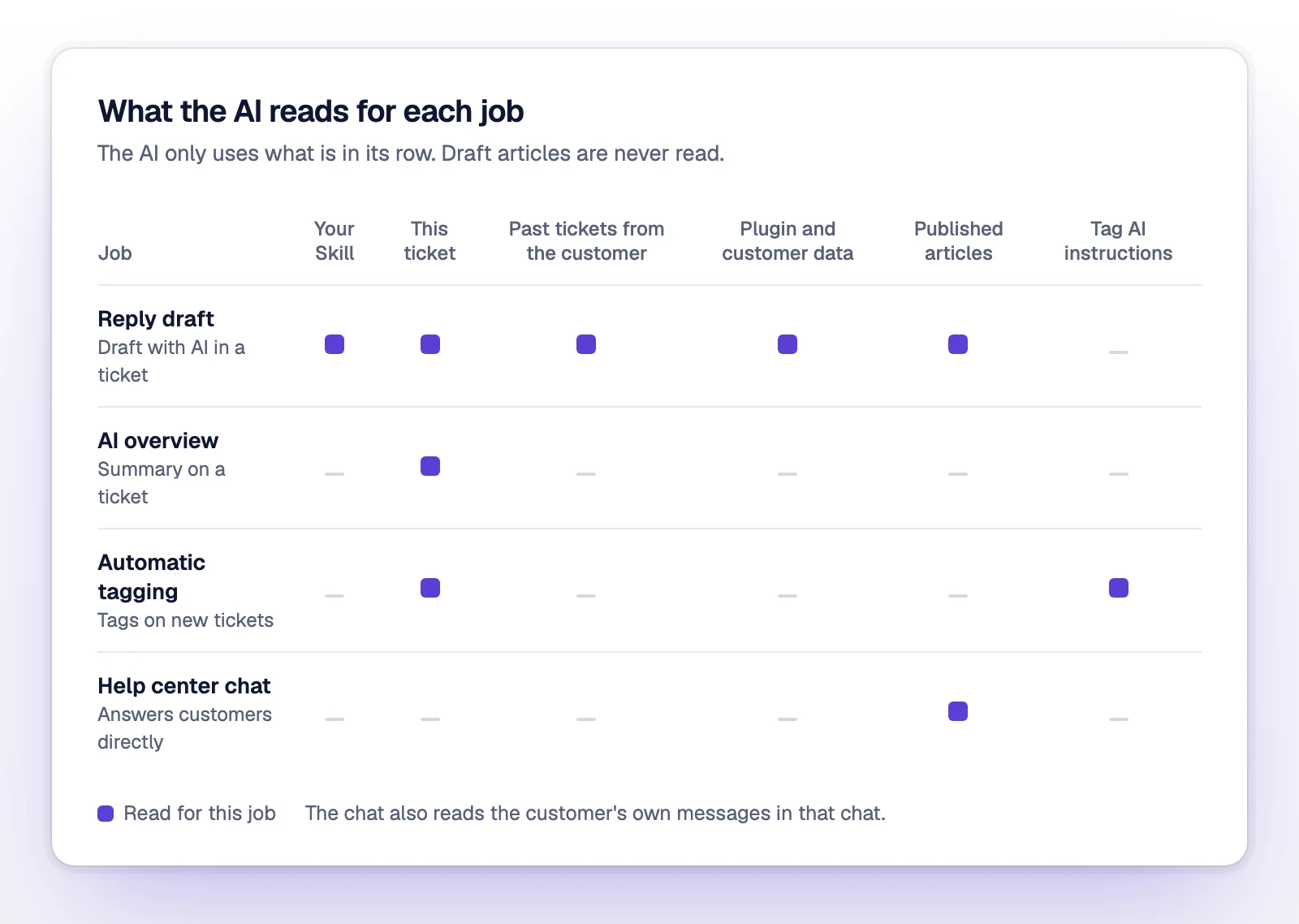
| Job | Where you see it | What it reads |
|---|---|---|
| Reply draft | Draft with AI in a ticket | Your Skill, the ticket and its messages, up to 5 past tickets from the same customer, data from your active plugins (including Bring your own data), the closest passages from your published help center articles, and any guidance you type for that draft |
| AI overview | AI overview at the top of a ticket | The ticket and its messages |
| Automatic tagging | Tags on new tickets | The ticket subject and body, and your tags with their AI instruction |
| Help center chat | Your help center and the chat widget on your site | Your published help center articles, and the customer's own messages in that chat |
The Skill is the instructions you write on AI & Knowledge > Agent instructions. See Write agent instructions.
When you save a published article, initdesk indexes it for the AI. The AI doesn't read your whole help center for each question. It searches by meaning, takes up to 5 passages that look closest to the question, and answers from those.
Two things follow from that:
Only the help center chat does. It lives on your help center and, if you install it, on your own site as the chat widget. Setup is in Add AI chat to your site.
The chat answers from your published articles. It replies in the language the customer writes in.
The chat hands over to your team by creating a ticket. It does this when:
Before it creates the ticket, the chat asks for the customer's name and email, so your team can follow up by email. A thin or imperfect article isn't a reason to hand over. The chat answers from it first and lets the customer say it didn't help.
The ticket arrives in your queue like any other. Your team replies from there.
Start with Improve AI answers. Most bad answers come from a missing or unclear article.
Check that its status is Published, not Draft. Indexing runs in the background after you save, so the AI may not see the change right away. Ask the question again a little later.